
Payment details
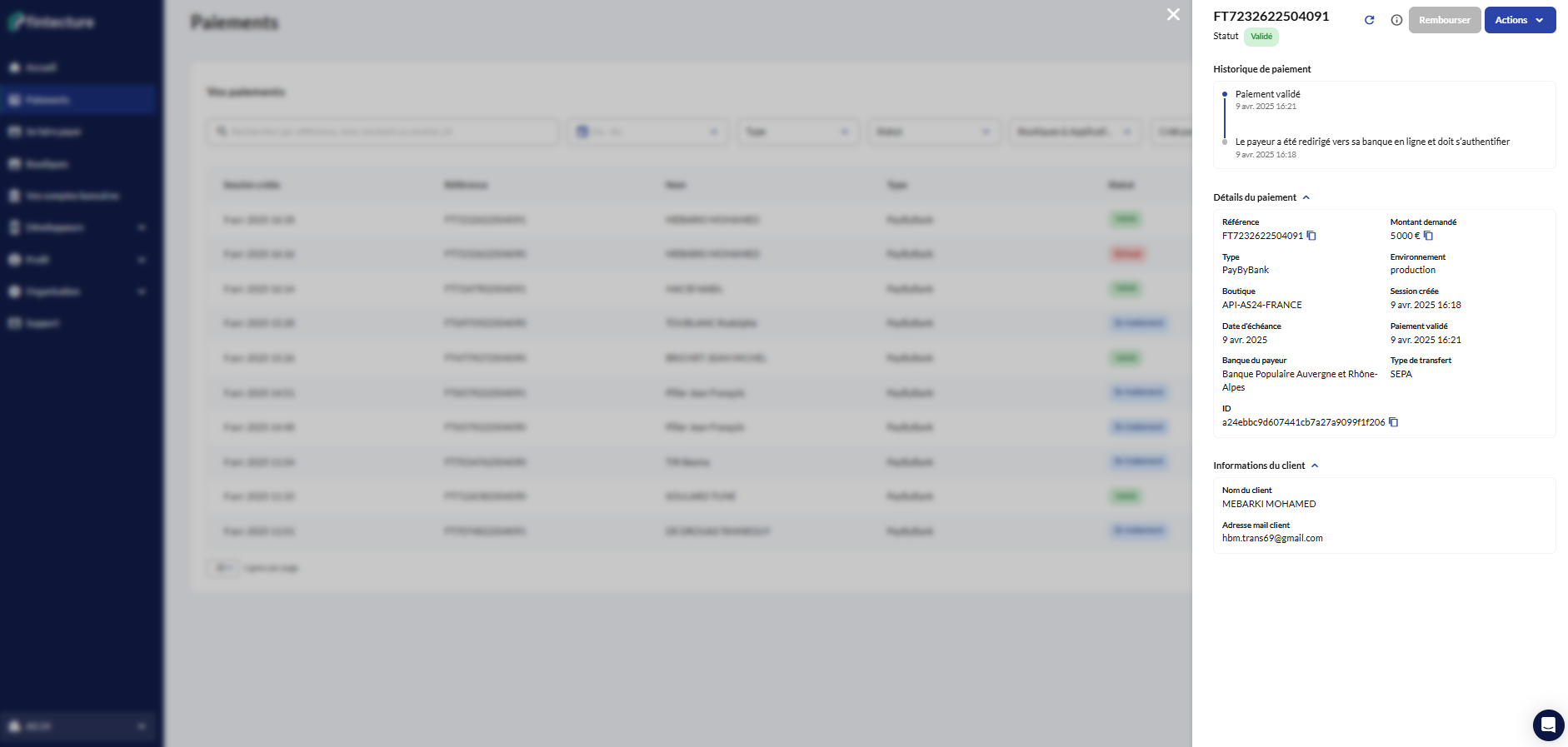
By clicking on a payment, you access additional information about it.
Depending on the payment type, the following elements are available in addition to the payment's reference and status:
Payment summary
The payment summary appears:
- for any payment with transactions (e.g. via a Swan bank account),
- or for a payment without transactions (external account) as soon as at least one refund has been made.
Payment history
The payment history is a timeline of all the statuses the payment has gone through, from creation to completion.
It also keeps track of all the actions performed, whether by the merchant or the payer.
Payment details
The details gather all the information known about the payment. Depending on the payment type, some information may not appear.
| Field | Description |
|---|---|
| Reference | Payment reference as specified at initiation |
| Type | Payment type (see the full list) |
| Shop | No Code shop, CMS or API application used for the initiation |
| Created by | User identifier of the initiator |
| Requested amount | Amount specified at initiation |
| Channel | Channel used (email, link, SMS) |
| Environment | Environment on which the payment was created (sandbox/production) |
| Session created | Session creation date |
| ID | Session identifier |
| Due date | Payment due date (only for an Immediate Transfer) |
| Payer's bank | Selected bank (only for an Immediate Transfer) |
| Completion date | Date on which the payment was completed |
| Transfer scheme | Bank scheme used (only for an Immediate Transfer) |
Customer details
The customer details gather the information collected about the payer during the payment session.
| Field | Description |
|---|---|
| Customer name | Name specified at initiation |
| Customer email | Email specified at initiation |
| Custom IBAN | Virtual IBAN dedicated to the customer (only for a Smart Transfer) |
Session details
The session details gather the technical information related to the payment session.
- If the payment is in a final status:
| Field | Description |
|---|---|
| ID | Payment session identifier |
| Date | Payment session creation date |
- If the payment is still waiting to be processed:
You can retrieve the session link or a QR code allowing the payer to proceed with the payment.
Updated 4 months ago
Did this page help you?